
Overview
This document will demonstrate how to create, maintain, or delete an Accounts Payable Invoice Terms. This step will also explain how to manually create an Accounts Payable Invoice Terms.
Since the create and change processes use the same menu paths and procedures, this procedure will walk you through the process of defining AP Invoice Terms.
Process
Invoice terms are the agreed-upon time frame for paying financial transactions. Invoice terms are used to determine when invoices, credit, and debit notes must be paid. If the invoice terms include a settlement discount, the discount is applied if payment is received early or on time.
In SYSPRO, invoice terms define the conditions under which the settlement discount is applied when accounts are settled (For example, when you settle bills for suppliers or when customers settle bills with you), as well as the conditions under which invoices are classified as overdue.
Pointers
Fields with a pull down indicate a valid list of values to select from. To enter a value, type it in or use the Magnifier glass to select the correct value.

Click the

button to post your entry. Use the Tab key to advance to the next field.
Procedures
- Create Accounts Payable Invoice Terms and populate the following details.
- Invoice Term
- Description
- Discount Percent
- Discount Days
- Save
- Change or delete Accounts Payable Invoice Terms.
- Select the Invoice Terms code that you wish you modify.
- Make the desired changes.
- Save
AP Invoice Terms Set Up
The procedures outlined below will guide you through the process of creating an invoice for accounts payable.
Menu Path:
Accounts Payable > Set Up > AP Invoice Terms
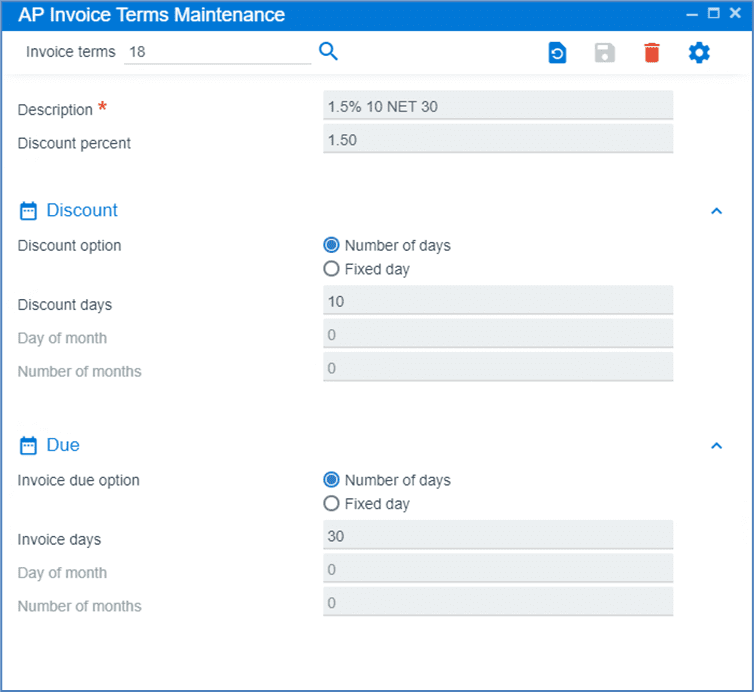
Field Name | R/O/D* | Description |
| Invoice terms | R | Enter the invoice terms code then, press tab. |
| Description | O | Enter the description. |
| Discount Percent | R | Enter the discount percent field. |
| Number of Days Discount Option is Active | R | Select number of days for the discount option. |
| Discount Days | R | Enter discount days in the field. |
| Number of Days Invoice is Due | R | Select number of days as the Invoice due option. |
| Invoice Days | R | Enter the invoice days field. |
| *R/O/D (Required / Optional / Display) | ||
Click on

to Save.
AP Invoice Terms Maintenance
The steps outlined below will guide you through making changes to an accounts payable term.
Menu Path:
Accounts Payable > Set Up > AP Invoice Terms

Field Name | R/O/D | Description |
| Invoice Terms | R | Enter the invoice terms code, then press tab. |
| Description | O | Enter or change the description. |
| Discount Percent | O | Enter or change the discount percent field. |
| Number of Days Discount Option is Active | R | Select the number of days as the discount option. |
| Discount Days | R | Enter discount days field. |
| Number of Days Invoice is Due | R | Select number of days as the Invoice due option. |
| Invoice Days | R | Enter the Invoice days field. |
Click on

to save.
AP Invoice Terms Deletion
The steps outlined below will guide you through deleting an accounts payable invoice term.
Menu Path:
Accounts Payable > Set Up > AP invoice terms
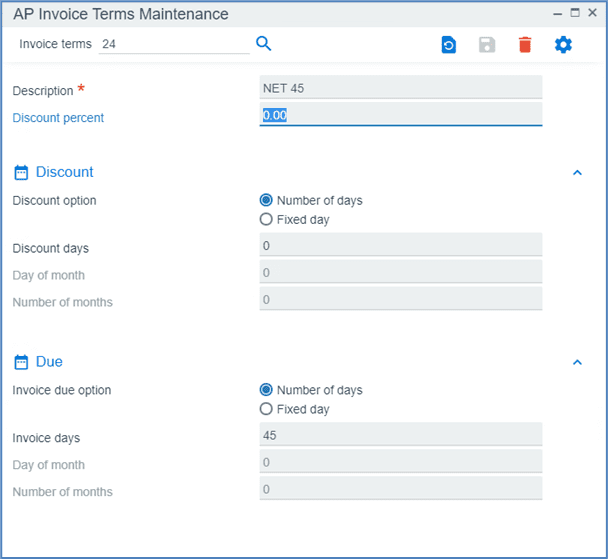
Field Name | R/O/D | Description |
| Invoice terms | R | Enter the invoice terms code, then press tab. |