
Overview
This document will explain the procedures for creating a new accounts payable branch and modifying an existing one. The manual set-up of an AP branch will also be provided. Both creation and modification processes use the same menu paths and procedures.
Process
Branches are used in SYSPRO to integrate transactions into the general ledger for balancing and control. Reasons for initiating this process include:
- A business necessity has arisen for the creation of an accounts payable branch.
- A branch is an administrative division within a larger or more complex organization.
Account Payable Branch Set Up
Menu Path
Accounts Payable > Set Up > AP Branches
Create Accounts Payable Branch and populate the following details:
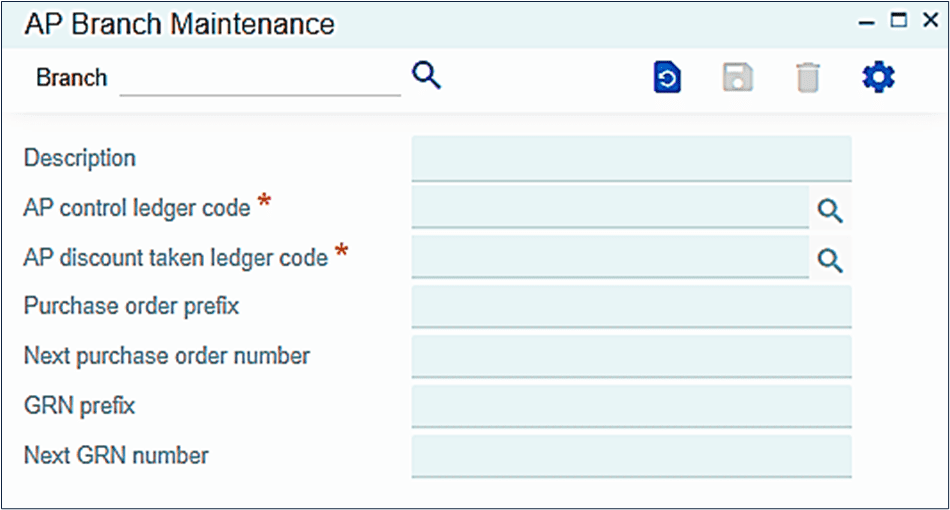
- Branch
- A/P control ledger code
- Description
- A/P discount taken ledger code
Change or delete the Accounts Payable Branch:
- Select the Branch that you wish you modify.
- Make the desired changes.
Note: Changes to the A/P control ledger code are not recommended if there are open A/P invoices to be paid against that branch.
Field Name | R/O/D* | Description |
| Branch | R | Enter the Branch code. |
| Description | O | Enter the Description of the branch. |
A/P Control Ledger Code | R | Enter /select the A/P control ledger code. |
A/P Discount Taken Ledger Code | R | Enter or select the A/P discount taken ledger code. |
| *R/O/D (Required / Optional / Display) | ||
Accounts Payable Branch Maintenance
To change or delete an accounts payable branch and any associated data, follow these steps:
Menu Path
Accounts Payable > Set Up > AP Branches
Field Name | R/O/D | Description |
| Branch | R | Select the Branch code. |
| A/P Control Ledger Code | R | Enter or select the new A/P Control Ledger Code. |
| Description | O | Enter the New Description of the Branch |
| A/P Discount Taken Ledger Code | R | Enter or select the new A/P discount taken ledger code. |
Click

to save changes made to the branch. Click

to delete the selected branch.