Blog

Inventory WHS Maintenance for Stock Codes

Overview

This document will detail how to assign stock codes to warehouses and define warehouse information for each stock code. A Stock Code must be created and assigned to a warehouse before transactions can be processed against it.

Process Summary

Create a warehouse and enter the following information.

  • Enter the stock code.
  • Enter the warehouse code.
  • Select Add Multiple Warehouses if stock needs to be applied to multiple warehouses. (Optional).
  • Cost Multiplier (Optional) Default ‘1’.

Inventory Warehouse Maintenance for Stock Code

Menu Path

Inventory > Setup > Inventory Warehouse Maintenance for Stock Code

Follow these steps to assign a stock code to one or more warehouses.

  • Enter the stock code.
  • Enter the warehouse code.
  • Select Add Multiple Warehouses to apply the stock code to multiple warehouses.
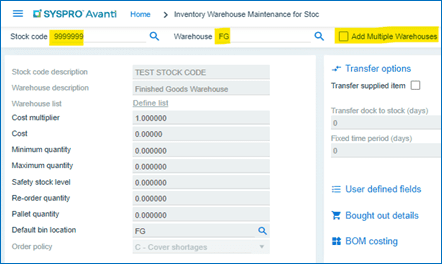
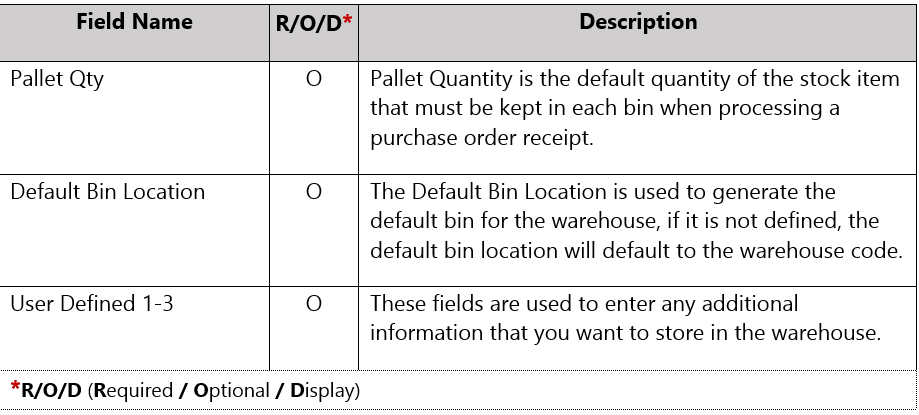
Picture23 - Inventory WHS Maintenance for Stock Codes

Screenshot 2025 07 29 114443 - Inventory WHS Maintenance for Stock Codes


Screenshot 2025 07 29 134324 - Inventory WHS Maintenance for Stock Codes

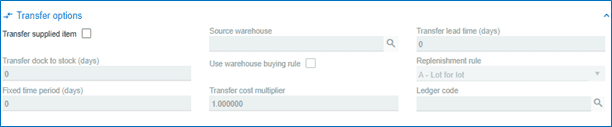
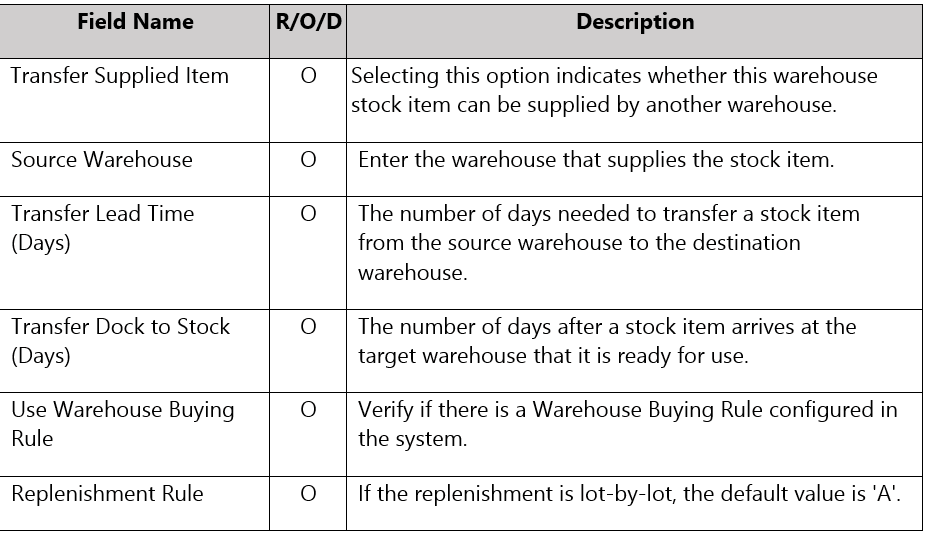
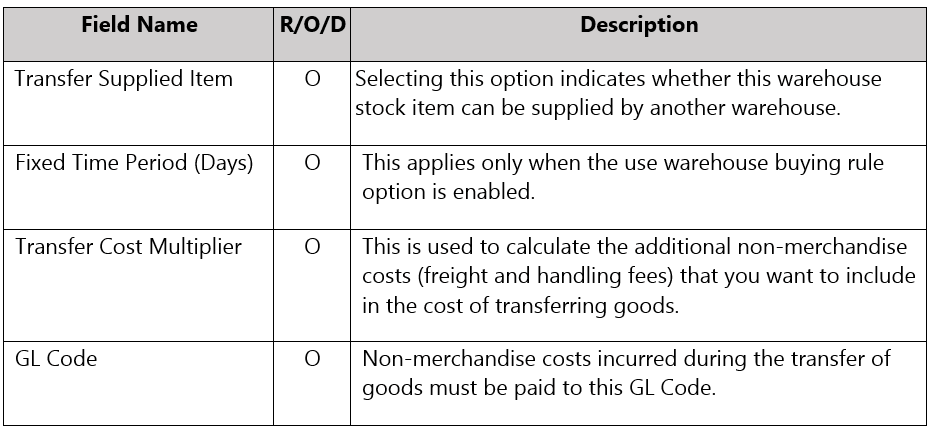
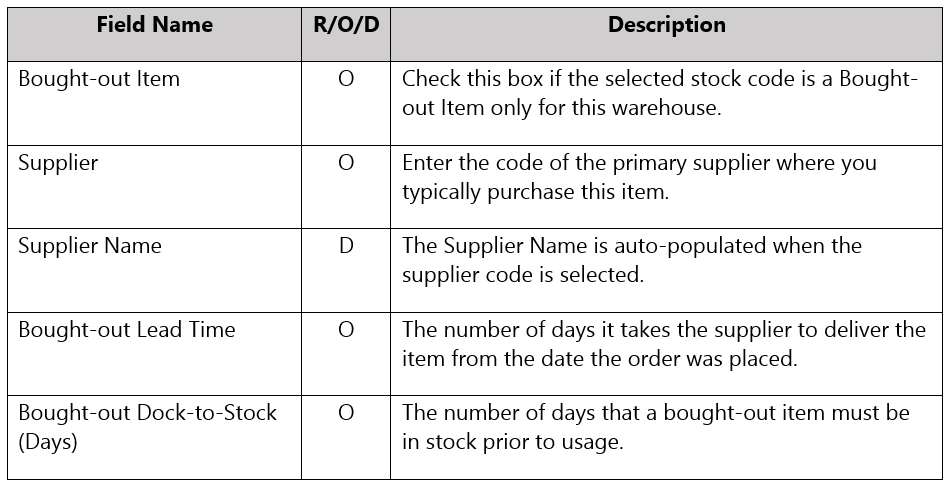
Transfer options - Inventory WHS Maintenance for Stock Codes

Transfer options2 - Inventory WHS Maintenance for Stock Codes

Transfer options3 - Inventory WHS Maintenance for Stock Codes

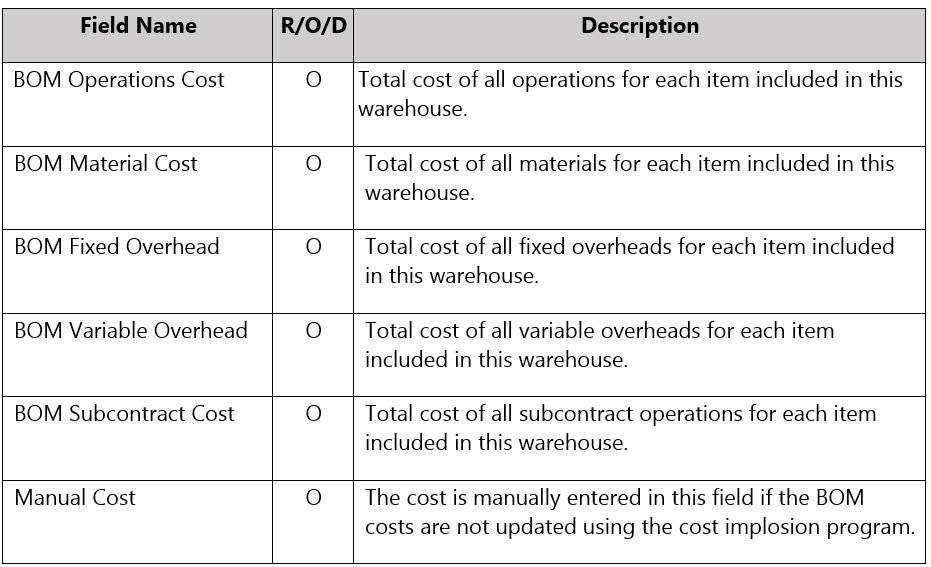
BOM costing - Inventory WHS Maintenance for Stock Codes

Screenshot 2025 07 29 134920 - Inventory WHS Maintenance for Stock Codes

Picture3 - Inventory WHS Maintenance for Stock Codes
Screenshot 2025 07 29 134938 - Inventory WHS Maintenance for Stock Codes

Click on

Picture4 - Inventory WHS Maintenance for Stock Codes  to Save

Closing Out the Year Strong: 5 ERP Moves to Make Before Q4 Ends

The year-end rush is a stress test for your ERP. Orders spike, inventory counts loom, and finance is already thinking about close. For manufacturers and distributors, Q4 shows you which parts of your system are carrying the business and which are quietly holding it...

Manage Supplier Data And Transactions In Syspro Avanti

01 Sign In To Syspro Avanti Hello, today we're going to talk about Syspro Avanti, master data, and how you can view, edit, and add new suppliers into your Syspro Avanti system. First, we'll enter our credentials and hit sign in. Video content Jump to this step in...

Customizing Grids in Syspro Avanti

This tutorial demonstrates how to customize grids within SYSPRO Avanti. You will learn to customize a grid today. Go to 10.88.78.245 01 Introduction Video content Jump to this step in video 02 Open Sign In Menu Enter your login credentials to begin accessing your...

Personalizing your Epicor Kinetic Home Screen

You will learn how to navigate the Home page and access key features within the Epicor ERP system. 01 Log In To Home Page Click the Log in button on the Home page to access your account and begin the process. 02 Click Navigation Link Click the 3 dots to access the...

Syspro Avanti Login and Dashboard Customization

This tutorial guides you through accessing SYSPRO Avanti and customizing your dashboard. 1. Introduction First let's login to your Syspro account by entering your credentials. Video content Jump to this step in video 2. Complete Sign-In Click "Sign in" to submit your...

epicor Kinetic Overview

As Epicor transitions away from the traditional client, all users will be working on the Kinetic web interface. The web version provides the same core functionality you're familiar with, but with a modern browser-based experience that can be accessed from anywhere...

5 Ways Better ERP Processes Can Help Reduce Phantom Stockouts

Phantom stockouts are one of the most frustrating inventory challenges manufacturers and distributors face because the inventory appears available in the system but cannot actually be found, allocated, or shipped when needed. The result is often production delays,...

Crawford Software to Attend Epicor Insights 2026 as Gold Sponsor

LONDONDERRY, N.H., April 13, 2026  -- Crawford Software, announced today that it is a Gold sponsor of Epicor Insights 2026, the cloud ERP company's annual global customer conference held this year May 18 – 21, 2026 at Gaylord Opryland Resort & Convention Center in...