Overview
This document will outline how the Miscellaneous Material program is used to issue miscellaneous parts from inventory; this function enables users to issue parts without assigning them to a specific job, such as transporting a sample item to a trade show. It can be used for a variety of tasks, including adjusting inventory quantities and managing miscellaneous shipments.
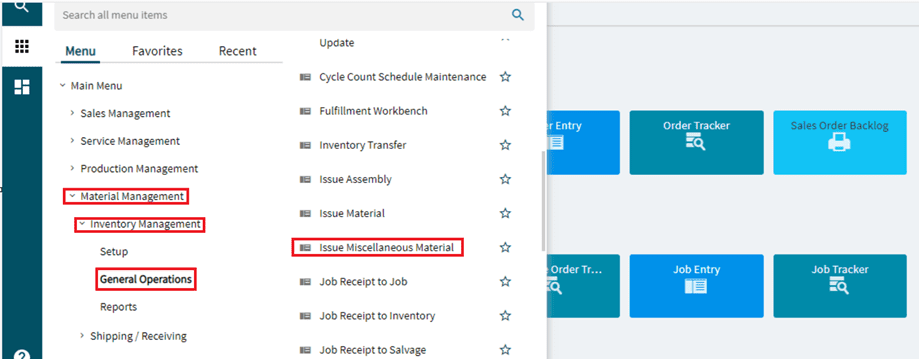
Menu Path
Material Management > Inventory Management > General Operation >Issue Miscellaneous Material
The following steps are required to complete the Issue Miscellaneous Material function.
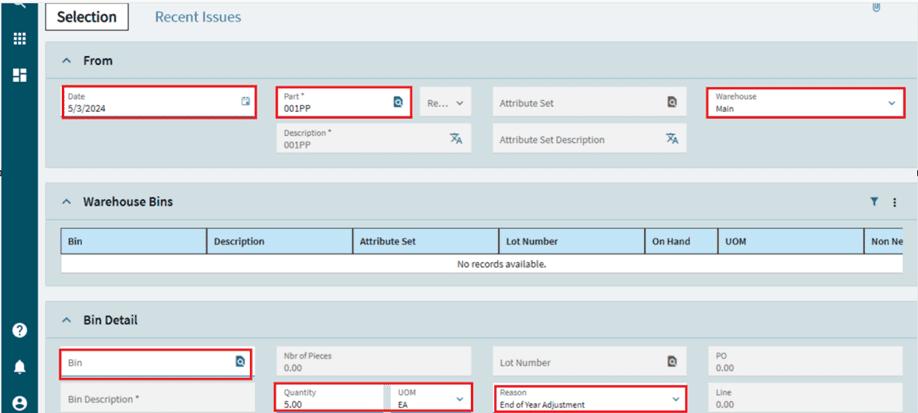
- Click the Part button to locate and select the required part number. You can enter the part number directly.
- Select a bin from the warehouse/bin grid that you wish to issue the material from.
- Enter the quantity you want to issue.
- Enter a comment in the reference field; the data you enter will be saved in the Part Transaction History file.
- Select a reason code for the Miscellaneous Issue. The reason code specifies the offsetting general ledger controls affected by this transaction.
- If the part is lot tracked, click the Lot Number button to locate and select the desired lot.
- If the part is serial-tracked, click the Serial Numbers button to select the serial numbers used with the issued quantity.
- When finished, click OK
Reference Diagrams