Overview
Return Assembly is the process of handling returned or defective stock or returning an assembly from a job to inventory; you can issue an inventoried item from stock to a job and then return the assembly to inventory. Top of Form
When returning an assembly from a job, several events occur:
- The IssuedQty and TotalCost values on the job assembly record are updated to reflect the quantity returned and the extended cost.
- Extended cost is calculated by multiplying the return quantity by the current inventory’s Average, Standard, or Last unit cost.
- The quantity returned increases the part’s On-hand and Allocated quantity in the Part Master File. In addition, the part is given a transaction history record.
- The transaction is identified as ASM-STK (Job Assembly Return).
Menu Path
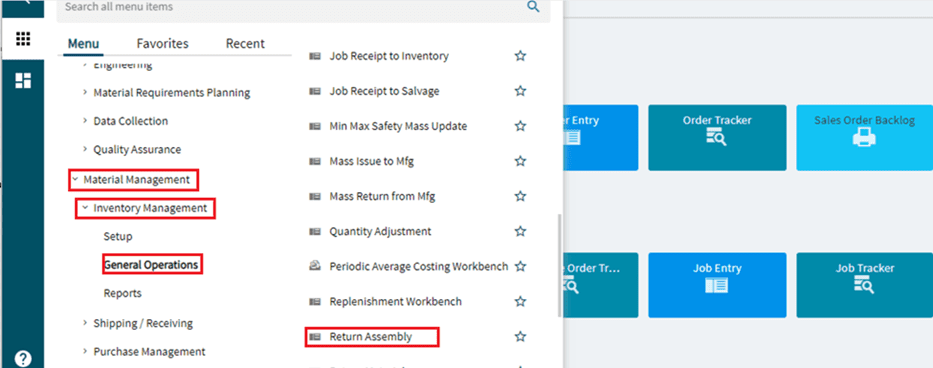
Material Management > Inventory Management > General Operations > Return Assembly
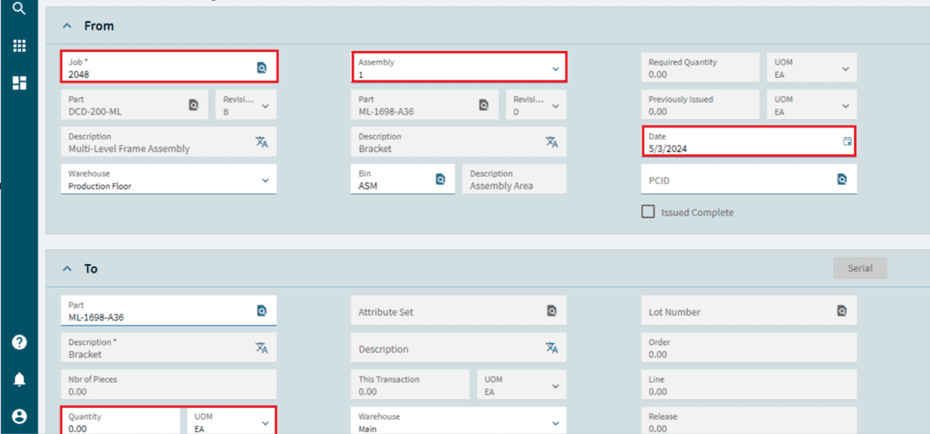
- Select or enter the job number.
- Select the assembly number.
- Check the Return Assembly date.
- Enter the quantity.
- Verify the warehouse and bin.
Reference Diagrams