
This document outlines the steps to create a new warehouse within SYSPRO, explain the manual process of creating a warehouse and the path menu, and show how workflow are the same for both the Create and Change processes.
Process Summary
As part of the warehouse setup, a new warehouse must be established. Create a warehouse and enter field data following the steps outlined below.
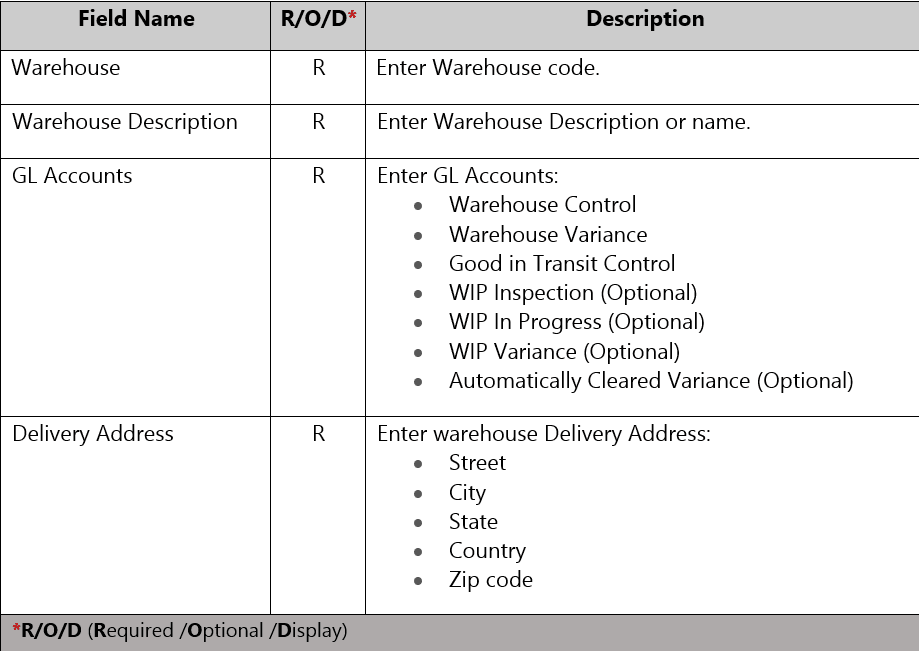
- Warehouse Description
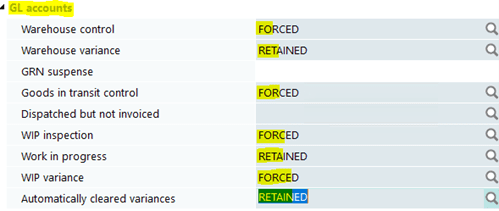
- GL Account
- Warehouse Control
- Warehouse Variance
- Good in Transit Control
- WIP Inspection (Optional)
- WIP In progress (Optional)
- WIP Variance (Optional)
- Automatically cleared Variance (Optional)
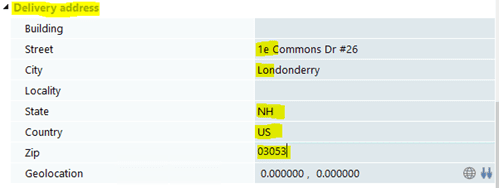
- Delivery Address
- Street
- City
- State
- Country
- Zip code
Warehouse Create
Menu Path
Inventory > Setup > Warehouses
- Enter Warehouse Code
- Enter Warehouse Description/Name
Warehouse Maintenance Screen

Enter GL Accounts
Enter Warehouse Address
- Click on Save.
- Warehouse is created.
- Exit transaction.